
Price History Trackers vs. Browser Coupon Extensions: Which Actually Saves You More?
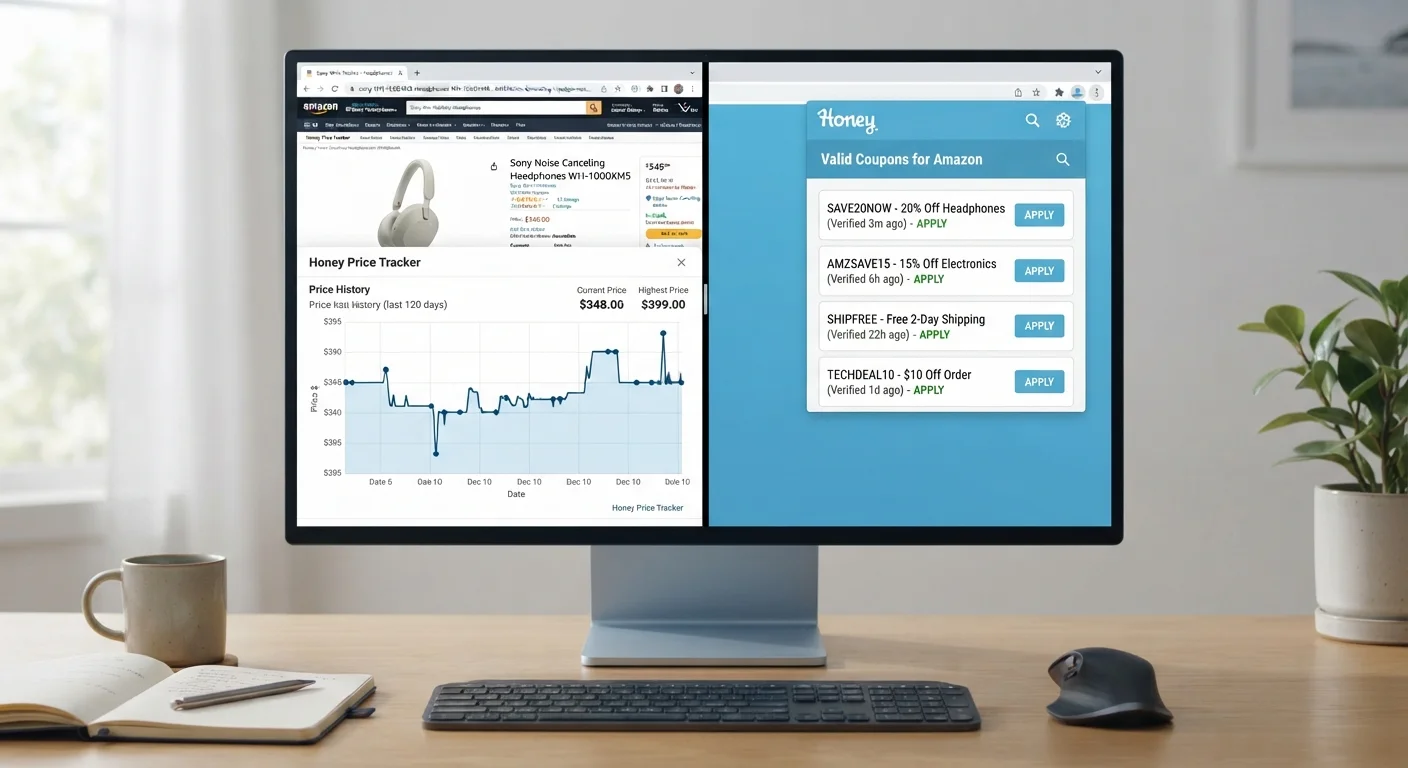
Photo credit: Wiseturt.com | Blogs Curated For You
Two popular deal-hunting tools explained side by side — how each works, what it misses, and when to use both together.
Key Takeaways
- Price history trackers show whether a 'sale' price is genuinely lower than the product's historical average.
- Browser coupon extensions automate promo code discovery but vary widely in how reliably codes actually work.
- Neither tool guarantees savings; used together, they address different stages of the buying decision.
- Coupon extensions may collect browsing or purchase data - review permissions before installing.
- Price trackers are most valuable for planned, higher-cost purchases where timing matters.
- The strongest strategy combines a price check with a coupon search at the moment of purchase.
How Each Tool Actually Works
Price history trackers are browser extensions or standalone websites that record a product's listed price over time - often months or years - and display that data as a chart. When you land on a product page, a tracker overlays or links to its historical price graph, letting you compare today's price against past highs and lows. Some services also let you set alerts that notify you by email when a price drops below a threshold you define. This is particularly useful for identifying genuine markdowns rather than cosmetic ones.
Browser coupon extensions work differently. They sit in your browser and activate at checkout, automatically scanning a database of known promo codes for the retailer you're visiting. The extension tests codes sequentially and applies whichever one produces the largest discount. Some extensions also surface cashback offers, which function more like a rebate applied after purchase. For context on how cashback mechanics compare, see the honest trade-offs of cashback programs.
| Criterion | Price History Trackers | Browser Coupon Extensions |
|---|---|---|
| Primary function | Show price trends over time | Apply promo codes at checkout |
| Best stage of purchase | Research and timing phase | Final checkout moment |
| Works across all retailers | Limited to supported stores | Broader retailer coverage |
| Requires user action | Yes - look up each product | Minimal - activates automatically |
| Data privacy considerations | Lower - reads product pages | Higher - may track browsing and purchases |
| Detects inflated 'original' prices | Yes, via historical graph | No |
| Savings reliability | High when history is available | Variable - many codes expire or fail |
| Price alert / notification feature | Common | Rare |
What Each Tool Misses
Price history trackers have a meaningful blind spot: they only know what prices have been listed as, not what shoppers have actually paid. A retailer can briefly inflate a price to create a high-water mark that makes later discounts look steeper than they are. Trackers record that inflated price as legitimate history. Additionally, trackers require you to look up each product individually - they're reactive to what you're already considering, not proactive about finding deals you haven't thought to search for.
Coupon extensions have their own limitations. The codes in their databases are often expired, store-specific, or restricted to first-time buyers. Even when a code applies, it may offer a modest reduction that doesn't reflect a genuine deal on an overpriced item. There's also a data privacy consideration: most extensions request permissions to read your browsing activity and, in some cases, purchase data. Before installing any extension, reviewing what data it collects and how it's used is a reasonable step. The complete guide to spotting real deals covers additional retailer tactics worth knowing.
A Note on Browser Extension Permissions
Many coupon extensions request broad permissions - such as access to all websites you visit - in order to detect checkout pages and retailer-specific data. This is a legitimate privacy trade-off to consider. Before installing any extension, check its stated data practices in the browser's extension store and read user reviews. If an extension requests more access than its stated function requires, that's worth noting. This general caution applies regardless of which specific extension you're evaluating.
When to Use Both - and How
The two tools solve different problems at different points in a purchase decision. A price tracker answers the question: Is this a real deal right now? A coupon extension answers: Can I reduce the price I'm already seeing? Running both in sequence is more useful than relying on either alone.
A practical sequence looks like this: before committing to a purchase, pull up the product's price history to confirm the current price is at or near a genuine low. If it isn't, consider setting a price alert and waiting. If the price looks legitimate, proceed to checkout and let a coupon extension attempt to apply any available codes. This approach is especially worthwhile for planned purchases - electronics, appliances, or seasonal items - where timing flexibility exists. For more on building this kind of routine, smart deal-hunting habits that hold up over time offers a broader framework.
~30%
Share of online 'sale' prices that are not genuine lows
Research by consumer advocacy groups and price-tracking services has repeatedly found that a significant share of promotional prices do not represent a meaningful reduction from the product's recent selling price.
~60%
Coupon codes that fail or are expired at checkout
Industry analyses of coupon extension databases consistently show that a large proportion of stored codes are expired, restricted, or store-specific, reducing the practical success rate considerably.
It's also worth knowing that coupon stacking - applying multiple discount codes or combining a code with a sale price - is sometimes possible but depends on retailer rules. Coupon stacking mechanics and limits are explained in detail separately. And if you're newer to these tools overall, a beginner's guide to deal hunting walks through the foundational concepts without assuming prior experience.

Author
Smart Shopping Editorial Team
Smart Shopping Editorial Team is the collective byline for our editorial team and contributor network. Articles published under this byline or an editorial pen name are researched, written, and reviewed according to our editorial standards for clarity, consistency, and independence before publication.
View all articles →